Frequently Asked Questions
-
Aw, that's nice. You want to send us something. We accept everything except, you know, not nice stuff.
Mueller, She Wrote
Attn: A.G.
3245 University Ave, Suite 163
San Diego, CA 92104 -
Thank you for your support!
It sounds like you are probably listening to the public feed and are not following your Patreon RSS in your podcast app.You can access your audio RSS link by clicking on the Collection tab on the creator page and selecting the podcast from the list. Once you’re on the Collection page, click the Add to podcast app button. A pop-up will show up, and then click Copy to get the RSS link in your clipboard. After that, you can paste it into your preferred podcast app.
-
It’s just another way to say “put a pin in it” or similar to Maddow’s “watch this space.” We explain more in Episode 24.
-
The research notes go out each week to Patrons.
You can also find the links to articles in each Beans episode notes. -
Ad-free episodes are posted to our Patreon page.
-
New episodes of The Daily Beans are published at 2AM Pacific Monday through Friday.
-
Sorry about that! We would recommend dropping your private rss feed directly into your regular podcast app. You can do that by following the instructions in this article.
-
We would first recommend reaching out to Patreon support, as they should have more info on this specific payment issue.
-
If your Patreon feed has stopped working it may be that your Subscription has lapsed. Check your current status by signing into Patreon. You may need to unfollow and re-follow your Patreon RSS URL.
If the RSS URL you received from Patreon never worked please check here for troubleshooting. -
You can listen to bonus episodes on Overcast by tapping the + button in the top right like you normally would to add a podcast on Overcast. Then tap “Add URL” in the top right, paste the feed URL and hit done!
Check here for more information -
You can listen to bonus episodes on your regular podcast app by adding your pvt feed URL to your podcast app. The private feed URL is emailed to every patron after they sign up. If you can't find it, it can also be found on the top right corner of the Mueller, She Wrote Patreon homepage, as long as you are signed in as a patron. Here's a link explaining how to listen to add your private feed URL to any podcast platform.
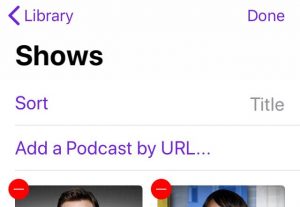
In the event the link above isn't current, you can try this:
- Open the app.
- Go to Library
- Select shows
- Hit edit
- Then, the “add a podcast by url” option appears under sort.